


In today’s digital ecosystem, your website is one of your most valuable business assets. But what many businesses don’t realize is that website malware attacks often remain invisible — until Google exposes them.
If you’ve ever searched your business name on Google and seen:
- Japanese or Chinese text in search results
- Spam titles and meta descriptions
- Fake product or adult keywords
- Pages you never created
— your website is already compromised.
At Website Drona, we help businesses recover from hacked websites, clean malware completely, and restore long-term security. This guide explains what website malware is, how it impacts Google rankings, and how we fix it professionally.
What Is a Malware Attack on a Website?
When people hear the word “malware,” they usually think of computer viruses. However, website malware attacks are far more dangerous for businesses.
A malware attack occurs when hackers inject malicious code into your website files or database without permission. This code silently:
- Creates hidden spam pages
- Injects foreign-language content
- Redirects visitors
- Manipulates Google search results
In simple words:
Your website may look completely normal to you — but Google and search engines see something very different.
Why Website Malware Is a Serious Google Issue
Unlike basic technical problems, malware directly damages your online credibility.
It affects:
- Google rankings
- Website traffic
- Brand trust
- Lead generation
- Revenue
Many business owners first discover malware only after seeing hacked content appearing in Google SERP — exactly like foreign-language results or spam listings.
This type of attack is especially dangerous because:
- Google may index hacked pages silently
- Rankings decline gradually
- The damage keeps increasing over time
This Is What a Malware-Infected Website Looks Like on Google SERP
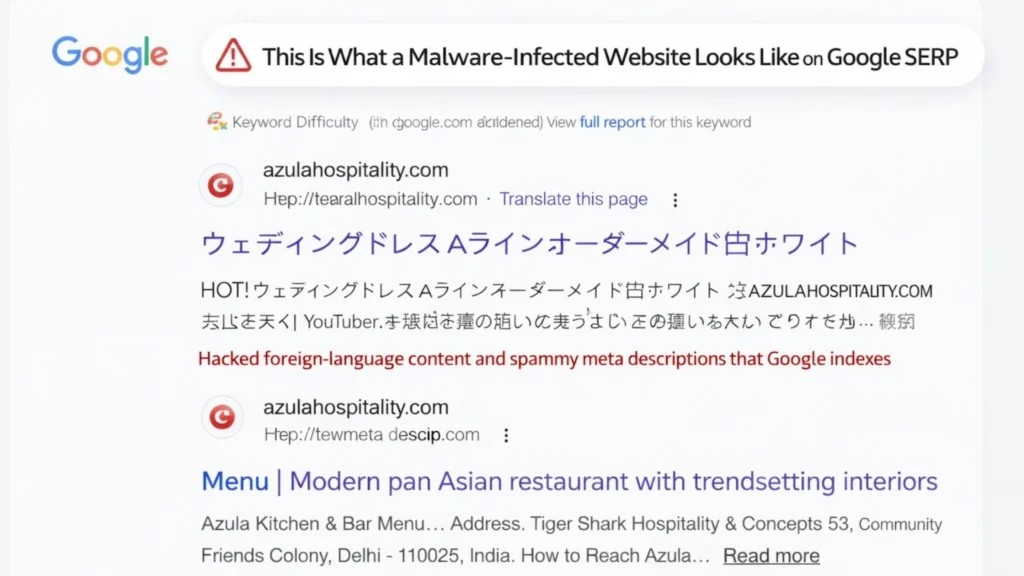
If your website looks completely normal when you open it, but Google search results show foreign-language or spam content, your website is already compromised.
This is one of the most dangerous forms of SEO malware.
It works silently in the background, manipulating what Google sees while keeping the front-end website unchanged for owners.
As a result, Google indexes hacked pages, spam titles, and fake keywords — which slowly destroys search trust, rankings, and organic visibility without any immediate warning.
Common Signs Your Website Is Infected
You may be facing a malware attack if you notice:
- Japanese / Chinese content in Google results
- Website looks normal but Google shows spam
- Sudden traffic or ranking drop
- Google Search Console security warnings
- Unknown files on server
- Unauthorized admin users
- Hosting provider malware alerts
If even one of these signs appears, immediate action is critical.
How Malware Attacks Work on Websites
Most website infections follow a predictable pattern:
- Hacker finds a vulnerability (outdated plugin, theme, or weak password)
- Malicious script is injected into files or database
- Hidden spam pages are auto-generated
- Google crawls and indexes hacked content
- Website rankings drop or site gets flagged
⚠️ In many cases, Google does not penalize immediately — the damage grows silently.
Types of Website Malware Attacks
- Hacked Content Injection
Creates hidden pages indexed by Google in foreign languages. - SEO Spam Malware
Abuses your domain authority to rank spam keywords. - Redirect Malware
Redirects visitors or Googlebot to malicious websites. - Backdoor Malware
Allows hackers to reinfect the website even after partial cleanup.
This is why simple file deletion never solves the problem.
How Website Drona Fixes Website Malware Permanently
We do not rely on automated tools or temporary fixes.
Our approach focuses on complete cleanup + root-cause elimination + long-term protection.
Below is our professional malware removal framework.
Immediate Website Backup & Isolation
Before any cleanup begins:
- Full website files backup
- Complete database backup
- Backup stored securely offline
- Temporary isolation if infection is spreading
✔ Prevents data loss
✔ Ensures safe recovery
Deliverable: Backup copy of your website
Identify & Remove Malicious Files
We perform deep manual scanning to detect:
- Obfuscated PHP malware
- Injected scripts
- Hidden backdoor files
- Malicious cron jobs
High-risk locations include:
- wp-config.php
- index.php
- uploads directory
- theme core files
Each infected file is reviewed and cleaned manually.
Credential Audit & Reset
To stop reinfection, we secure:
- WordPress admin logins
- Database credentials
- Hosting panel access
- FTP / SFTP credentials
Weak or reused passwords are fully eliminated.
Server-Level Cleansing
We inspect and clean:
- Temporary directories
- Hidden system folders
- File permissions
- Suspicious server processes
This step is essential for shared and VPS hosting environments.
Database Malware Cleanup
Many attacks hide spam content or injected code directly in the database.
We scan and clean:
- Posts, pages, and custom tables
- Hidden injections in user accounts
- Malicious scripts in options and settings
Google Hacked Content Issue Fixed Successfully by Website Drona
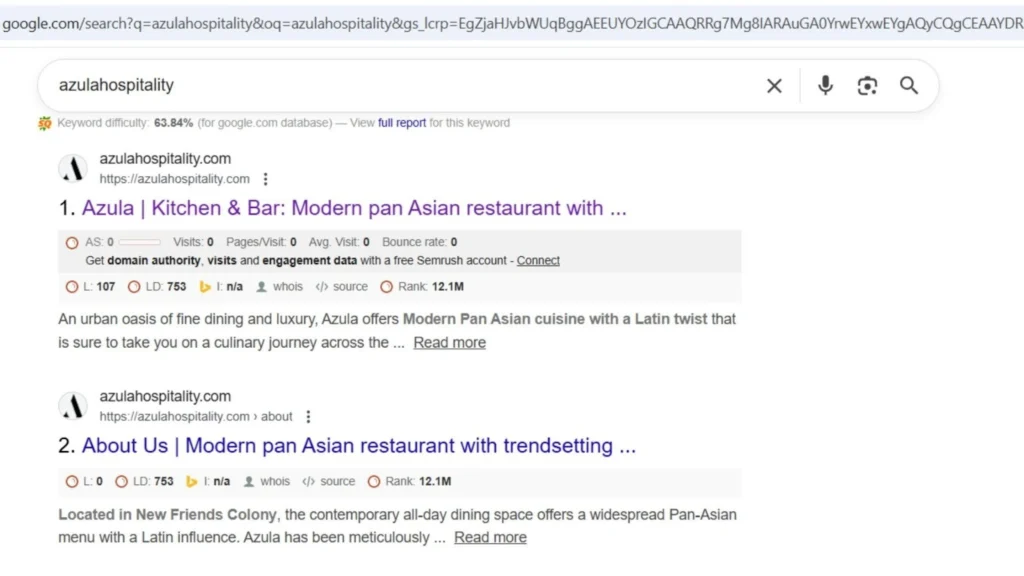
After the issue was fixed by Website Drona:
- Foreign-language (Japanese / spam) content removed from Google SERP
- Fake and auto-generated pages de-indexed
- Original titles and meta descriptions restored
- Google Search Console security issues resolved
- Website rankings stabilized
- Organic traffic gradually recovered
This confirms that complete malware removal combined with root-cause fixing is essential for long-term recovery — not temporary cleanup.