

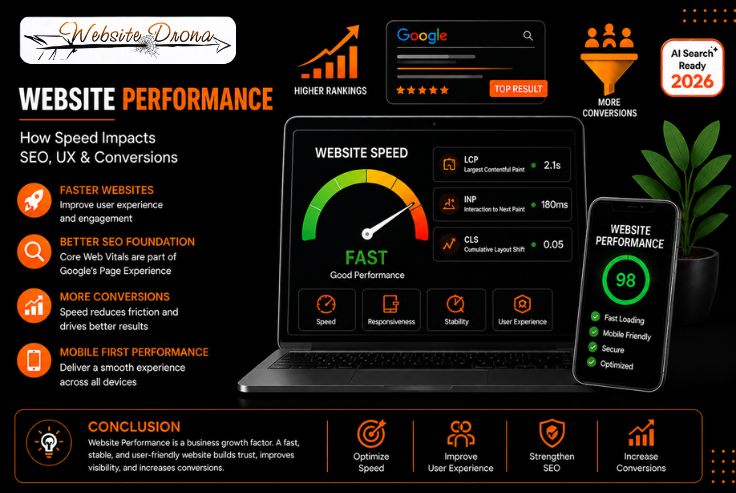
A business website needs to do more than look professional. It should load efficiently, respond smoothly, remain visually stable, and provide a reliable experience across devices. This is where Website Performance becomes an important part of both digital experience and business growth.
A slow website can create friction before a visitor reaches a product page, submits an enquiry, requests a quotation, or completes a purchase. Performance issues can also affect important aspects of user experience and search visibility, particularly when pages provide a poor experience on real devices.
At Website Drona, we view website performance as a combination of technical efficiency, user experience, mobile usability, SEO considerations, and conversion performance. Effective Website Performance Optimization is not about chasing a perfect score in a testing tool. It is about identifying meaningful performance problems, addressing their underlying causes, and monitoring how the website performs for real users.
What Is Website Performance?
Website Performance refers to how quickly, reliably, and smoothly a website loads and responds when users access and interact with it.
Performance involves more than the initial page-loading time. A website can appear to load quickly but still provide a poor experience if buttons respond slowly, images cause the layout to shift, or important content takes too long to become visible.
A well-performing website should:
- Display important content efficiently
- Respond quickly to user interactions
- Maintain a stable layout
- Work effectively across mobile and desktop devices
- Handle resources efficiently
- Provide reliable navigation
- Remain responsive throughout the user journey
This is why modern Website Speed Optimization should focus on the complete user experience rather than a single performance metric.
Why Website Performance Matters for Businesses
Website performance can influence multiple stages of the customer journey. A potential customer may discover a business through Google Search, an advertisement, social media, a referral, or another digital channel. The website then becomes an important environment where that visitor evaluates the business.
If the website introduces unnecessary delays or interaction problems, it can create friction at a critical stage.
Better User Experience
Users are more likely to have a positive experience when pages load efficiently, and interactions work without noticeable delays. Efficient performance helps users access information, navigate between pages, and interact with important elements without unnecessary delays.
A better-performing website can support:
- Faster access to important information
- Smoother navigation
- More responsive interactions
- Better mobile usability
- Less friction during important actions
- A more consistent browsing experience
A Stronger SEO Foundation
Website performance is one component of the broader page experience considered by Google. Core Web Vitals measure important aspects of loading performance, responsiveness, and visual stability.
However, performance should not be presented as a shortcut to higher rankings. Google explains that good Core Web Vitals alone do not guarantee strong search rankings. Relevance, content quality, technical accessibility, authority, and other systems also influence search performance.
Therefore, Page Speed Optimization should support a broader SEO strategy rather than replace it.
More Conversion Opportunities
Performance can affect how easily visitors complete valuable actions.
Depending on the business model, these actions may include:
- Submitting a lead form
- Calling a business
- Requesting a quotation
- Booking a consultation
- Adding products to a cart
- Completing checkout
- Downloading a resource
A performance issue that delays or disrupts one of these actions can introduce unnecessary friction.
Better Mobile Experience
Mobile performance deserves particular attention because users access websites through different devices, connection speeds, and hardware capabilities.
A website that performs well on a powerful desktop computer does not automatically provide the same experience on a mobile device.
Stronger Brand Experience
Website performance also contributes to how visitors perceive a business.
A website that responds smoothly and remains stable can create a more professional digital experience. In contrast, repeated delays, broken interactions, or shifting layouts can reduce confidence.
How Website Speed Impacts SEO
Website Speed and SEO are related, but the relationship needs to be understood accurately.
Google’s current documentation explains that Core Web Vitals are part of page experience, while also emphasizing that strong Core Web Vitals alone do not guarantee high search rankings.
This means businesses should not approach SEO with the assumption:
Improve speed → automatically rank higher.
A more realistic framework is:
Useful Content + Search Relevance + Technical SEO + Good Page Experience + Strong Website Performance + Authority
Website performance can strengthen the technical and user-experience foundation of a website, but it works alongside other SEO factors.
Website Performance and Page Experience
Page experience encompasses multiple aspects of how users interact with a page.
Core Web Vitals are an important component, but businesses should also consider mobile usability, secure connections, intrusive elements, and the overall quality of the experience.
The objective should be to make the website genuinely useful and easy to use, not simply to achieve a technical score.
Why Page Speed Alone Does Not Guarantee Higher Rankings
A fast website can still perform poorly in search if its content does not satisfy the user’s search intent.
For example, a page could load extremely quickly but fail to answer the user’s question, provide insufficient information, or lack credibility.
That is why Website Performance Optimization should be integrated with content strategy, technical SEO, information architecture, and conversion optimization.
Core Web Vitals Explained
Core Web Vitals are user-focused metrics that measure important aspects of the web experience.
Google currently identifies three Core Web Vitals:
- Largest Contentful Paint (LCP)
- Interaction to Next Paint (INP)
- Cumulative Layout Shift (CLS)
Largest Contentful Paint (LCP)
LCP measures how quickly the largest visible content element becomes available within the viewport.
This could be a prominent heading, large image, video poster, or another major content element.
Google considers an LCP of 2.5 seconds or less to represent a good experience.
Poor LCP can be caused by:
- Slow server response
- Large images
- Render-blocking resources
- Inefficient resource prioritization
- Heavy client-side rendering
Interaction to Next Paint (INP)
INP indicates how quickly a webpage reacts to actions performed by its visitors.
When users click, tap, or interact with elements, the website should respond without unnecessary delay.
Google recommends an INP of less than 200 milliseconds for a good experience.
Common causes of poor responsiveness include:
- Excessive JavaScript
- Long-running browser tasks
- Heavy third-party scripts
- Inefficient event handling
Cumulative Layout Shift (CLS)
CLS reflects the extent to which page content moves unexpectedly during a visitor’s browsing experience.
For example, if a visitor is about to click a button and an image suddenly loads above it, the button may move. This can cause frustration or accidental clicks.
Web pages should aim for a CLS value of 0.1 or lower to meet Google’s recommended Core Web Vitals threshold.
Stable dimensions for images, videos, ads, and other dynamic elements can help reduce layout shifts.
How Website Performance Affects User Experience
Performance should always be evaluated from the user’s perspective.
Faster Content Visibility
Important content should become available without unnecessary delays.
For business websites, this includes:
- Headlines
- Service information
- Product information
- Navigation
- Calls to action
- Important images
More Responsive Interactions
A page is not truly responsive simply because its visual content appears quickly.
Menus, forms, buttons, filters, calculators, and other interactive components also need to respond efficiently.
Better Visual Stability
Users should be able to read and interact with content without unexpected movement.
Stable layouts are particularly important for pages containing forms, navigation, advertisements, product information, or dynamically loaded content.
Improved Mobile Usability
Mobile users interact with websites through smaller screens and touch interfaces.
Performance optimization should therefore be combined with:
- Responsive layouts
- Easy navigation
- Appropriate touch targets
- Efficient images
- Lightweight resources
- Clear content hierarchy
Less Friction During Navigation
Performance problems can compound when users visit multiple pages.
A delay on one page may seem minor. Repeated delays across service pages, product pages, forms, and checkout can create a much more frustrating experience.
How Website Speed Impacts Conversions
For businesses that depend on online enquiries or sales, the relationship between Website Speed and Conversions deserves particular attention.
Visitors rarely convert immediately. They may first research the business, compare options, review services, examine products, and then take action.
Every unnecessary delay can add friction to that journey.
Lead Generation
Lead-generation websites often depend on:
- Contact forms
- Quote requests
- Consultation bookings
- Phone calls
- WhatsApp enquiries
- Demo requests
These conversion points should remain responsive and easy to use.
E-commerce Sales
E-commerce performance needs to be considered across the complete buying journey:
Product discovery → Product page → Cart → Checkout → Payment
Performance problems can become particularly costly when they occur during high-intent actions.
A 2026 web.dev case study involving Nuvemshop reported a 68% improvement in LCP, a rise in its Core Web Vitals pass rate from 48% to 72%, and an 8.9% increase in conversions following performance improvements. This provides a useful real-world example of how technical performance work can be connected with business outcomes.
However, individual case-study results should not be treated as a guaranteed outcome for every website. Performance improvements can produce different results depending on the audience, technology, traffic sources, offer, and conversion journey.
Contact Forms and Enquiries
A lead form should load efficiently, become interactive quickly, and provide clear feedback when users submit information.
Technical improvements are most valuable when they remove friction from actual conversion paths.
Checkout Experience
For online stores, performance optimization should continue through checkout.
Optimizing only the homepage while checkout remains slow does not address the complete customer experience.
Website Performance on Mobile vs Desktop
Performance needs to be evaluated across different devices and real-world conditions.
Mobile visitors may experience:
- Slower connections
- Different network conditions
- Lower processing capabilities
- Smaller screens
- Touch-based interactions
Common Mobile Performance Issues
Common problems include:
- Oversized images
- Heavy animations
- Excessive JavaScript
- Poorly optimized menus
- Large third-party resources
- Unnecessary pop-ups
- Desktop-oriented assets
How to Improve Mobile Performance
A practical approach includes:
- Optimizing responsive images
- Reducing unnecessary JavaScript
- Prioritizing critical content
- Improving server response
- Reducing unnecessary third-party resources
- Testing real mobile experiences
What Causes Poor Website Performance?
Poor performance can come from several layers of a website.
Unoptimized Images
Large images can consume significant bandwidth and delay important content.
Images should be resized appropriately, compressed, and delivered in suitable formats.
Excessive JavaScript and CSS
Unused or inefficient code increases browser workload.
Reducing unnecessary resources can improve both loading and responsiveness.
Slow Server Response
Website performance also depends on the infrastructure behind the page.
Hosting, server configuration, application architecture, database operations, and traffic levels can influence response times.
Too Many Third-Party Scripts
Analytics, advertising, chat widgets, tracking systems, social integrations, and other external tools can increase page complexity.
Every third-party resource should have a clear business or functional purpose.
Unnecessary Plugins
CMS websites can accumulate plugins over time.
Unused or poorly maintained plugins may introduce additional scripts, database queries, conflicts, or maintenance concerns.
How to Measure Website Performance
Effective Website Performance Optimization starts with measurement.
Google PageSpeed Insights
PageSpeed Insights can provide performance analysis and recommendations while incorporating available real-user experience data.
Google Search Console
Search Console’s Core Web Vitals reporting helps website owners identify groups of URLs that may have performance issues.
Lighthouse
Lighthouse provides audits that can help developers identify potential performance problems and improvement opportunities.
Chrome UX Report
Chrome UX Report provides real-user experience data based on Chrome users.
Lab Data vs Real-User Data
This distinction is important.
Lab data provides controlled testing conditions and helps identify technical problems.
Field data reflects the experiences of real users across different devices and network environments.
Google’s documentation highlights the importance of understanding both types of performance data when evaluating Core Web Vitals.
Using both can provide a more complete picture of website performance.
How to Improve Website Performance
A successful Page Speed Optimization strategy should prioritize meaningful problems rather than attempting to optimize every technical detail equally.
1. Optimize Images
Resize, compress, and appropriately format images. Avoid serving unnecessarily large files to small screens.
2. Improve Server Response Time
Review hosting, server configuration, caching, database operations, and application performance.
3. Reduce Unnecessary JavaScript
Remove scripts that aren’t needed and defer non-critical work where appropriate.
4. Optimize CSS and Fonts
Reduce unnecessary styles and make sure important fonts are delivered efficiently.
5. Implement Effective Caching
Caching can reduce repeated processing and improve delivery for returning visitors.
6. Review Third-Party Scripts
Regularly evaluate analytics, advertising, chat, tracking, and other external resources.
7. Use Lazy Loading Appropriately
Non-critical resources can often be loaded on demand rather than immediately.
8. Improve Mobile Performance
Prioritize mobile pages and test them under realistic conditions.
9. Monitor Core Web Vitals
Performance should be monitored continuously, especially after significant website changes.
Common Website Performance Mistakes Businesses Should Avoid
Businesses often make performance optimization harder than necessary.
Avoid these common mistakes:
- Chasing a perfect PageSpeed score without considering users
- Optimizing only desktop performance
- Ignoring real-user data
- Uploading oversized images
- Installing unnecessary plugins
- Using excessive animations
- Adding too many third-party scripts
- Optimizing only the homepage
- Ignoring important conversion pages
- Treating performance as a one-time project
The objective isn’t simply to achieve a higher testing score.
The objective is to create a website that real users can access, understand, navigate, and interact with efficiently.
Website Performance Checklist for 2026
Use this checklist to review your website:
- Check Core Web Vitals
- Review mobile performance
- Optimize images
- Evaluate server response time
- Reduce unnecessary JavaScript
- Review CSS and fonts
- Audit third-party scripts
- Implement appropriate caching
- Check layout stability
- Test important landing pages
- Test lead-generation pages
- Test product and checkout pages
- Compare lab and field data
- Monitor performance after major updates
How Often Should You Monitor Website Performance?
Website performance should be treated as an ongoing process.
A website can become slower as new functionality, integrations, content, tracking scripts, plugins, and media are introduced.
Review performance after:
- Website redesigns
- Major development changes
- Plugin or theme updates
- Hosting migrations
- New advertising integrations
- New analytics or tracking tools
- Template changes
- Major content updates
Regular monitoring helps identify performance regressions before they create significant user or business problems.
Conclusion
Website Performance is no longer just a technical consideration; it is an important part of a successful digital strategy. Faster loading, responsive interactions, visual stability, and strong mobile performance can create a better user experience while supporting SEO and conversion opportunities.
Effective Website Performance Optimization should therefore go beyond improving a PageSpeed score. It should address Website Speed, Core Web Vitals, technical efficiency, user experience, and conversion paths to create a website that performs effectively for both users and businesses.
At Website Drona, we approach website performance as part of the complete website lifecycle, from design and development to SEO, optimization, and ongoing monitoring. The goal is not simply to make a website faster; it is to create a reliable, user-friendly, search-ready digital platform that supports visibility, leads, and long-term business growth.
Frequently Asked Questions
What is website performance?
Website performance describes how quickly, reliably, and smoothly a website loads and responds to users across different devices and network conditions.
Does website speed affect SEO?
Yes, website performance and Core Web Vitals are part of Google’s broader page-experience considerations. However, good performance alone does not guarantee higher rankings. Search relevance, content quality, technical SEO, authority, and other factors also influence rankings.
Does website speed affect conversions?
Website speed can influence the user experience and reduce or increase friction during conversion actions. Its impact can vary depending on the website, audience, industry, traffic source, and conversion journey.
What are Core Web Vitals?
Core Web Vitals are user-focused metrics that measure loading performance, responsiveness, and visual stability. Google’s current Core Web Vitals are LCP, INP, and CLS.
What is a good website speed?
There is no single loading time that defines a good website in every situation. Businesses should evaluate Core Web Vitals, real-user data, mobile performance, and the complete page experience.